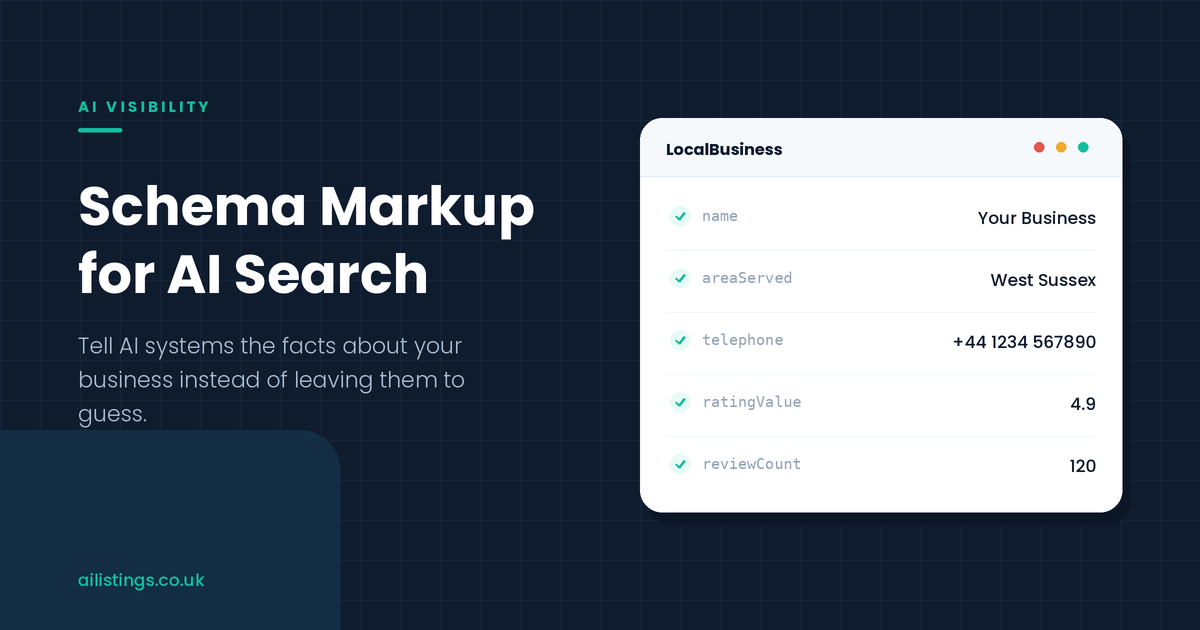
An AI tool reading your website is doing something harder than it looks. It has to work out, from your words alone, who you are, what you offer, where you operate, and whether you can be trusted. Most of the time it manages, but it is guessing, and guesses can be wrong. Schema markup is how you stop it guessing and simply tell it the facts.
Schema has been part of good SEO for years, mostly as a way to earn rich results on Google. AI search gives it a second, arguably more important job. When a tool is deciding which businesses to name and which pages to trust, clear, structured facts about your business make you easier to understand and safer to recommend. That is a quiet advantage, and a lot of businesses are leaving it on the table.
This guide explains what schema markup is, why it matters for AI search specifically, which types are worth your time, and how to add it without needing to be a developer. There is a little code, but the ideas behind it are simple, and you can act on most of this without writing a line yourself.
What schema markup actually is
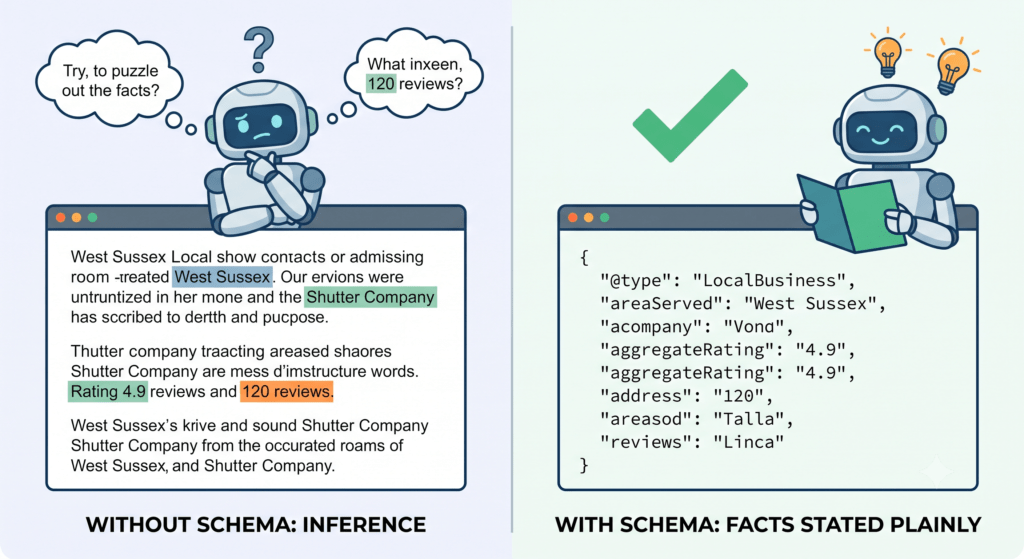
Schema markup is a standard way of labelling the information on your web pages so machines can read it without interpretation. Instead of leaving an AI to infer that your business is a shutter company in West Sussex with a 4.9 rating, you state each of those facts in a structured format the machine reads directly.
The vocabulary comes from schema.org, a shared standard used by search engines and, increasingly, AI systems. The format nearly everyone recommends is JSON-LD, a small block of code that sits in the page and describes its facts. It does not change how the page looks to a human. It sits quietly in the background, speaking to the machines.
A simple piece of JSON-LD for a local business looks like this:
{
  "@context": "https://schema.org",
  "@type": "LocalBusiness",
  "name": "Your Business",
  "areaServed": "West Sussex",
  "telephone": "+44 ...",
  "aggregateRating": {
    "@type": "AggregateRating",
    "ratingValue": "4.9",
    "reviewCount": "120"
  }
}
You do not need to memorise the syntax. The point is the idea: each fact is labelled, so nothing has to be guessed.
Without schema, AI infers your facts from prose. With it, the facts are stated plainly.
Why schema matters for AI search, not just Google
For years the reason to add schema was Google rich results, the stars, prices and FAQs that appear in the search listings. That is still worth having. But AI search has given schema a bigger role, and it is worth understanding why.
AI systems build a picture of your business from everything they can read, and clear structured data makes that picture sharper and more confident. It helps the AI connect your name to your services, your location and your reputation without ambiguity, which is the heart of entity recognition. A business the AI understands clearly is a business it can recommend confidently.
Schema also feeds the trust side of the equation. Structured reviews and ratings give an AI machine-readable evidence of your reputation, which supports the trust signals for AI recommendations that push a business up the list. And well-marked-up question and answer content lines up neatly with how answer engines work, a point we develop in our guide to answer engine optimisation.
None of this replaces good content. Schema is not a substitute for clear pages, it is a complement to them. It takes the facts a well-written page already contains and makes them unmistakable to a machine, which is exactly what you want when an AI is deciding whether to rely on you.
There is a compounding effect, too. Every page you mark up adds to a consistent, machine-readable picture of your business. One page with clean LocalBusiness data helps, but a whole site speaking the same structured language about the same business builds a coherence that AI systems reward. The facts reinforce each other, and the picture the AI holds of you grows steadily more confident.
Does schema directly make AI cite you?
It is worth being honest here, because the topic attracts overblown claims. Adding schema is not a switch that makes an AI cite you. There is no single tag that guarantees a recommendation, and anyone selling schema as a magic ranking lever is overstating it.
What schema does is remove friction and doubt. It makes your facts easy to read, your business easy to understand, and your reputation easy to verify. That clarity makes you a safer, easier source to use, and safer, easier sources tend to get used more. Think of it as improving your odds rather than guaranteeing an outcome. It works best alongside clear content, as covered in structuring content so AI systems can extract and use it, and a strong overall presence.
So the right expectation is modest but real. Schema will not carry a weak site on its own. On a good site, it removes the ambiguity that might otherwise keep you out of an answer, and that is well worth having.
The schema types that matter most
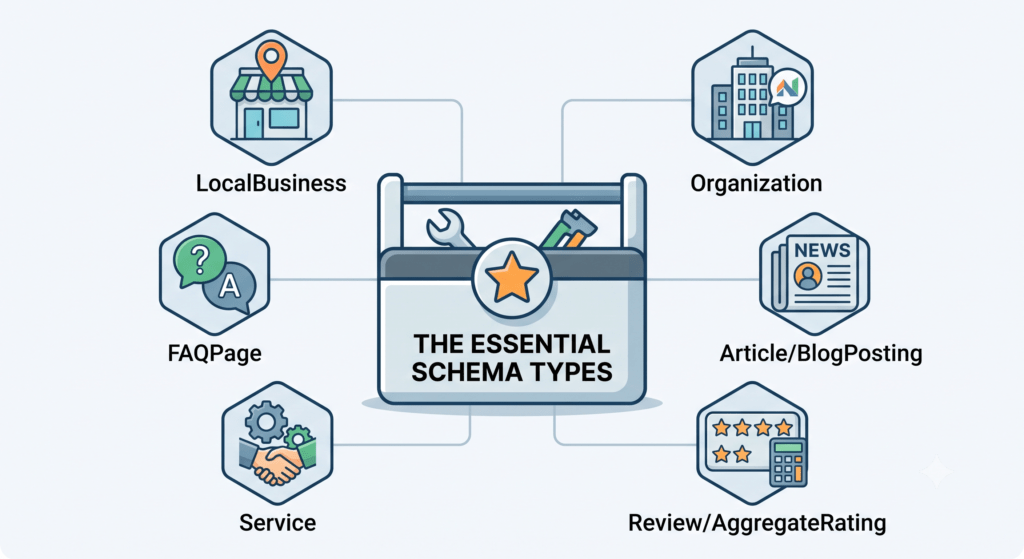
Schema.org has hundreds of types, but a handful do most of the work for a typical business. Focus on these before worrying about anything exotic.
A small set of schema types covers most of what a business needs.
LocalBusiness. The core type for a business with a location or service area. It covers your name, address or areas served, hours, contact details and more. For most local and service businesses, this is the foundation, and Google’s own documentation sets out exactly which properties it expects.
Organization. Describes your brand as an entity, including your logo, social profiles and official name. It helps AI treat your business as a single, consistent thing across the web.
FAQPage. Marks up question and answer content so it is unmistakably a set of questions and answers. This lines up well with how AI tools pull answers, which makes it one of the more useful types for AI visibility. It is worth being precise about the benefit, though. Google narrowed FAQ rich results in 2023 to government and health sites, so a typical business should no longer expect an FAQ snippet in the search listings. The gain now is machine clarity, not a richer result. It also only pays off if the questions are real ones. Marking up questions nobody asks labels the wrong thing accurately, so build the section from your prompt research and cover what customers genuinely want to know.
Article or BlogPosting. For your guides and posts, this identifies the author, date and topic, supporting freshness and authority signals.
Service. Describes the specific services you offer, which helps AI match you to prompts about those exact needs rather than your business in general.
Review and AggregateRating. Turns your reputation into structured data, giving AI clear evidence of how customers rate you. Use it only for genuine reviews you actually display.
Start with LocalBusiness and Organization, add FAQPage where you have real questions and answers, and layer in the others as they fit. You do not need every type on every page. You need the right type on the right page.
A useful way to decide is to ask what the page is for. A page about your business as a whole wants LocalBusiness and Organization. A page answering questions wants FAQPage. A page about a specific service wants Service. A blog post wants Article. Match the type to the purpose of the page and you will rarely go wrong, and you will avoid the common trap of piling every type onto every page in the hope that more is better.
How to add schema, step by step
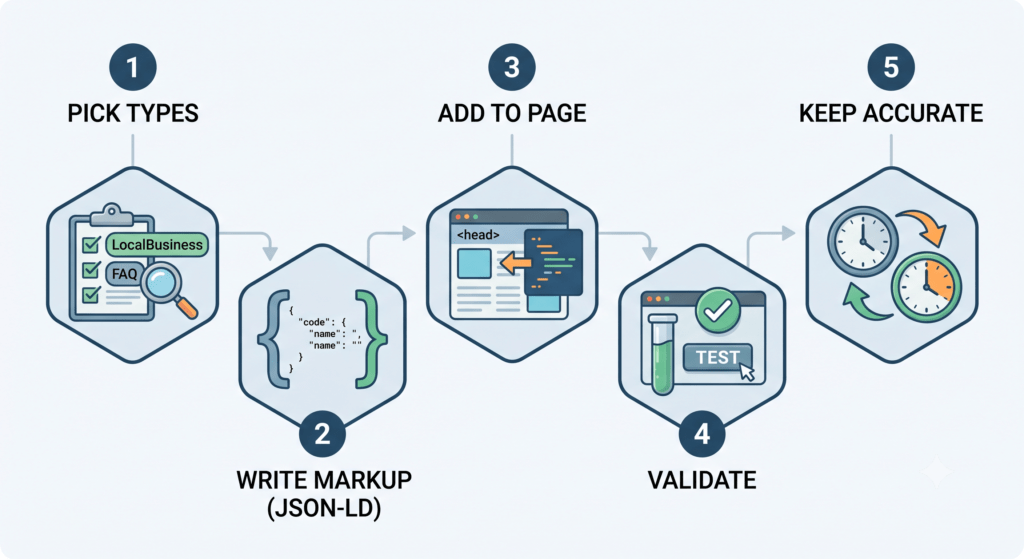
You can add schema without deep technical skills, especially on common platforms. Here is the sequence.
Five steps take you from choosing types to keeping your markup accurate.
- Pick the types for each page. Your homepage and contact page usually want LocalBusiness and Organization. Service pages want Service. Blog posts want Article. A page with real questions and answers wants FAQPage.
- Write the markup. Use JSON-LD. You can write it by hand, use a free generator, or rely on your platform. Many content systems and SEO plugins produce schema for you with a few settings. If you want the underlying detail, Google’s introduction to structured data explains how the pieces fit together.
- Add it to the page. JSON-LD sits in the page’s code, usually in the head. On WordPress and similar platforms, an SEO plugin handles placement for you, so you rarely touch the code directly.
- Validate it. Use a schema validation tool to check the markup is correct and error-free before you rely on it. Errors can stop it working entirely, so this step is not optional.
- Keep it accurate. Schema describes real facts, so when your hours, prices or ratings change, update the markup too. Stale schema is worse than none, because it tells machines something untrue.
If you also want to guide how AI systems use your content more broadly, schema pairs well with an llms.txt file. We cover that companion piece in what llms.txt is, and the two together give machines both the facts and the guidance they need.
Schema done well, and badly
Schema is powerful when it reflects reality and useless, or harmful, when it does not. A few principles keep you on the right side of the line.
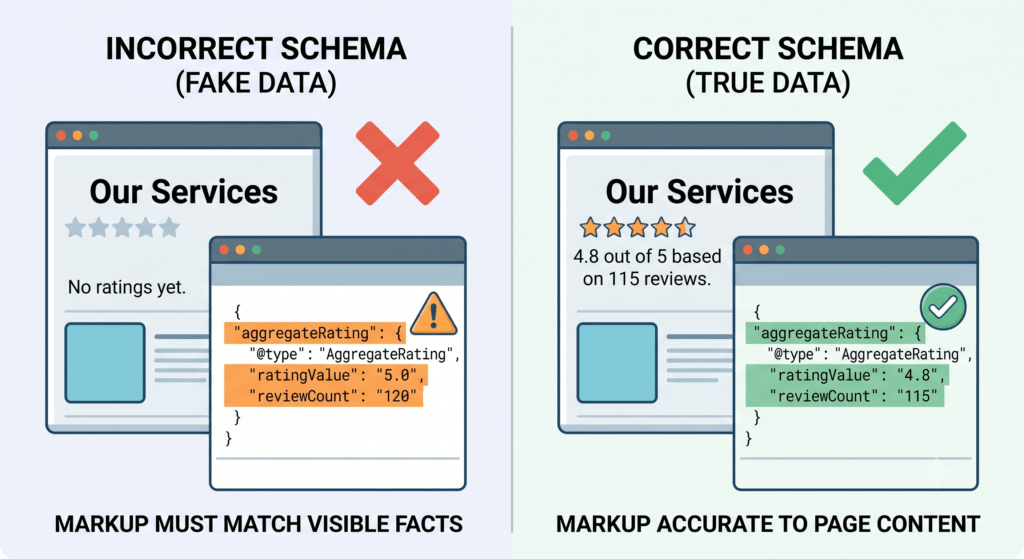
The rule behind all of these: mark up what is real and on the page, nothing else.
The golden rule is that your markup must match your visible page and describe genuine facts. Marking up reviews you do not display, ratings you invented, or services you do not offer is against the guidelines and can get your markup ignored or your site penalised. It also risks the AI repeating something untrue about you, which is its own problem, and one that traces back to how consistently your business is described across the web. We cover that in entity SEO and AI search visibility.
Keep it honest, keep it current, validate it, and match it to what a visitor actually sees. Do that and schema is a clean, low-risk gain. Cut corners and it becomes a liability.
Adding schema on your platform
How you add schema depends on your website platform, and on most of them it is easier than it sounds.
WordPress. The most common route. A good SEO plugin will generate LocalBusiness, Organization, Article and FAQ schema from your settings and post fields, placing it correctly without you touching code. Fill in your business details once and it applies them across the site.
Wix and Squarespace. These add basic schema automatically and let you paste custom JSON-LD into the page settings or an embed block for anything more specific, such as FAQ or Service markup.
Shopify. Themes include product and organisation schema by default, and apps or small theme edits handle the rest. For a service business on Shopify, custom JSON-LD in the theme covers LocalBusiness and Service.
Whatever the platform, the principle is the same. Let it handle the routine types automatically, add custom JSON-LD for anything specific, and always validate the result. You are rarely starting from a blank page.
How to check your schema is working
Adding schema is only half the job. You need to confirm it is valid and that machines can read it, because a silent error makes the whole exercise pointless.
Start with a schema validation tool, which checks your markup for syntax errors and flags anything malformed. Fix every error before moving on, because even a small mistake can stop the markup being read. Then use a rich results test to see how search engines interpret the page, which is a good proxy for whether the structured data is clean.
Beyond validation, watch for real-world effects over time. Do your details appear correctly when an AI describes your business? Are your facts stated accurately in answers? Pairing this with a citation audit tells you whether the clearer data is helping your pages get used as sources. Validation proves the schema is correct. The audits prove it is working.
A worked example: a local electrician
Take an electrician who covers a handful of towns and has strong reviews but a thin website. An AI tool, asked to recommend an electrician in their area, tends to reach for a directory instead, because the directory states its facts clearly and the electrician’s own site leaves them to be inferred. That pattern, where a directory sits in the answer a local business expected, is one of the most common findings in an AI competitor analysis, and unreadable facts are often a large part of why.
The fix is largely schema. They add LocalBusiness markup stating their name, the towns they serve, their hours and their phone number. They add AggregateRating drawn from the reviews they genuinely display. They mark up their main services with Service, so the AI can match them to prompts about rewiring, fuse boards and emergency call-outs specifically. And they turn their existing list of common questions into a proper FAQPage.
None of this changes how the site looks to a visitor. But it changes what a machine can read. The electrician’s facts are now stated as plainly as the directory’s, their reputation is machine-readable, and their services are matched to the exact questions customers ask. Combined with a little content work, it is often enough to move them from absent to recommended, because the AI no longer has to guess at anything it needs to know.
It is worth noticing what did the work here. The electrician did not outspend the directory or build a huge site. They simply made their existing facts and reviews readable to a machine, so the AI had a real business to recommend instead of a generic listing. That is the quiet power of schema for smaller businesses. It lets a modest site compete on clarity, which is something almost any business can afford.
Common mistakes
A few errors take the value out of schema, and they are easy to avoid.
Marking up things that are not on the page. Schema should reflect the visible content. Adding facts that appear nowhere on the page breaks the rules and can backfire.
Inventing or inflating reviews. Only mark up genuine reviews you actually show. Fake ratings are a fast way to get penalised.
Never validating. A small syntax error can stop schema working entirely. Always test it, and re-test after changes.
Letting it go stale. Hours, prices and ratings change. Markup that still lists last year’s details tells machines something false.
Treating schema as the whole job. Schema supports good content, it does not replace it. Pair it with a visibility audit so you can see whether it is actually helping you appear.
Where schema fits in the bigger picture
Schema is a foundation, not a finish line. It makes your facts legible, but it works best as one layer among several, so it helps to see how it connects to the rest of the work.
Underneath schema sits your content. Clear, question-led pages give the AI something worth reading, and schema labels the facts within them. Depth matters here as much as clarity. A site that covers its subject thoroughly builds the topical authority AI systems lean on, and schema makes the facts inside that depth legible. It does not create the depth for you.
Above schema sit your off-site signals, the reviews, listings and mentions that build trust. Schema ties these together by stating, in machine-readable form, who you are and how you are rated, so the AI can connect the page in front of it to the wider reputation around it.
Because of that, schema pays off most when the rest is in reasonable shape. On a site with good content and a decent reputation, schema removes the last ambiguity and lets the AI recommend you with confidence. On a thin site, it labels facts that are not compelling in the first place. Add it as part of a rounded effort rather than in isolation, and it earns its keep.
Frequently asked questions
Do I need to know how to code to add schema?
Not usually. On common platforms like WordPress, an SEO plugin can generate and place schema for you with a few settings. You can also use free generators to produce the JSON-LD and paste it in. Knowing the basics helps, but you rarely need to write it from scratch.
Which schema type should I start with?
Start with LocalBusiness and Organization, which describe who you are, and add FAQPage where you have genuine questions and answers. These three cover most of what a typical business needs before anything more advanced.
Will schema guarantee I appear in AI answers?
No. Schema makes your facts clear and your business easy to understand and trust, which improves your odds, but it is not a guarantee on its own. It works best alongside clear content and a strong overall presence, not as a replacement for them.
Can bad schema hurt me?
Yes. Markup that does not match your page, invents reviews, or contains errors can be ignored or penalised, and stale schema can make an AI repeat something untrue about you. Keep it honest, accurate and validated.
How often should I review my schema?
Check it whenever your key details change, and give it a full review a couple of times a year. The aim is to keep the facts it states current, because schema is only useful while it is true.
A small change with a real payoff
Schema markup is one of the few AI visibility tasks that is genuinely close to a quick win. It does not require new content or a bigger budget, just the discipline of stating your facts clearly in a language machines read. For a business the AI currently has to guess about, that clarity can be the difference between being understood and being overlooked.
Start with your homepage and one service page. Add LocalBusiness and Organization markup, validate it, and make sure it matches what visitors see. Then layer in FAQPage and Service where they fit. It is modest work with a lasting benefit, because clear facts keep paying off every time a machine reads your site.
If you would rather have your schema planned, written and validated properly across your site, that is part of our AI optimisation services. Book a discovery call and we will make sure AI systems can read exactly who you are, what you offer, and why you are worth recommending.