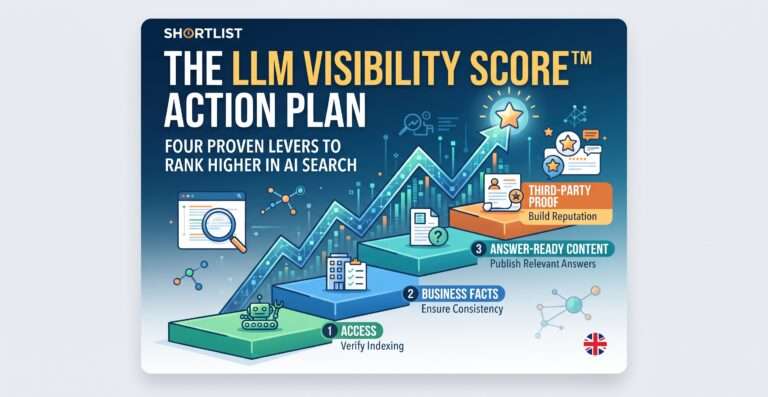
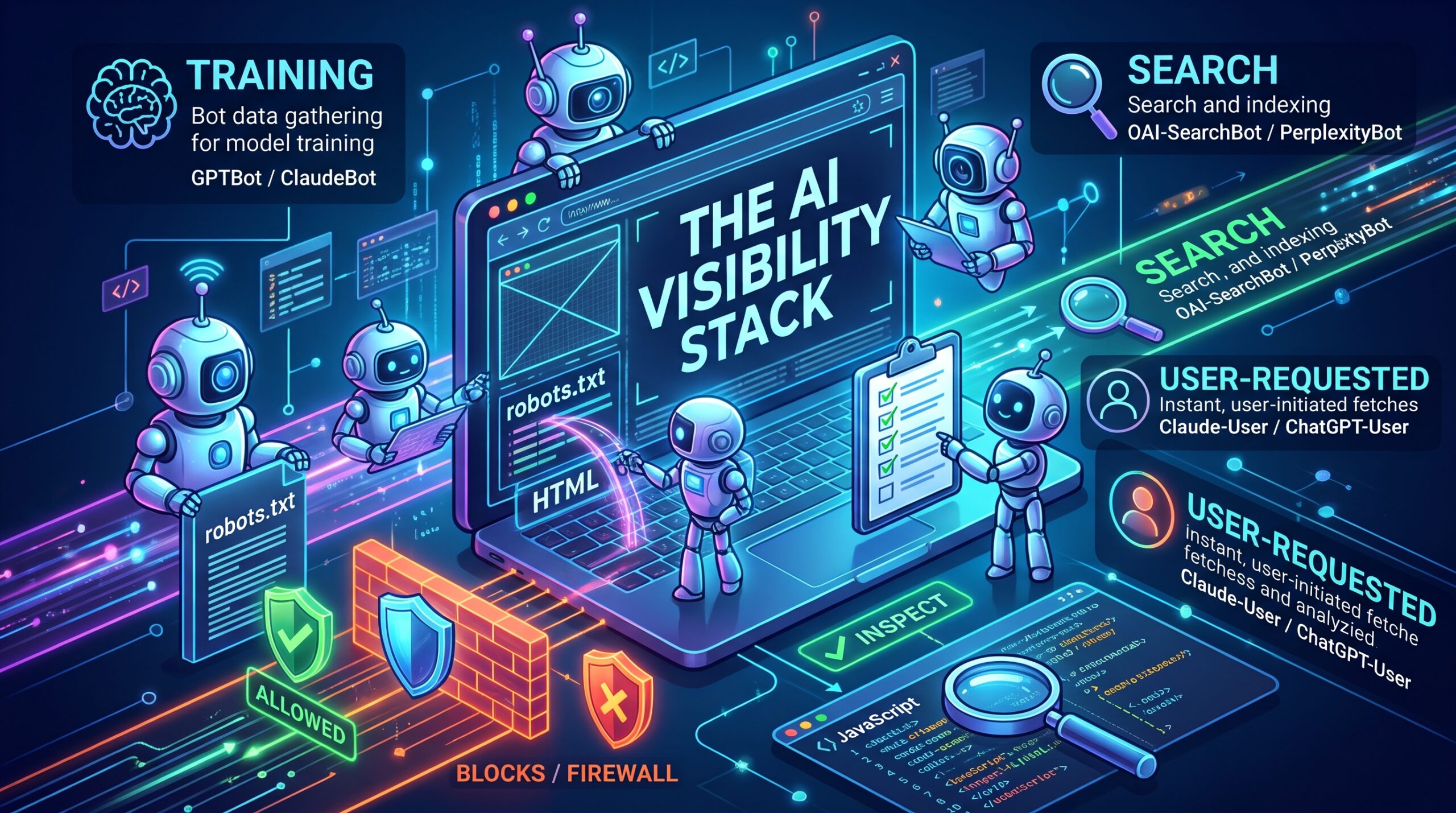
Before an AI tool can recommend your business, software has to fetch your pages and make sense of them. That access layer works silently until it breaks. One line in robots.txt, a firewall setting or a page that only appears after JavaScript runs can make you invisible to the tools your customers now ask.
This guide covers the bots that matter, how to allow or block them, why rendering decides what they can read, and how to check what they actually see. It is the base layer of the AI visibility stack, written to be worked through as a checklist.
In short: AI companies run separate bots for training, for search and for fetching pages a user asks about. Blocking one does not block the others. Choose which to allow in robots.txt, check your firewall agrees, keep key content in the initial HTML because most AI crawlers do not run JavaScript, and confirm access in your server logs.
What are AI crawlers, and why do they visit your site?
An AI crawler fetches web pages for an AI company. Each identifies itself with a user agent name, such as GPTBot, which is how your server and robots.txt tell bots apart.
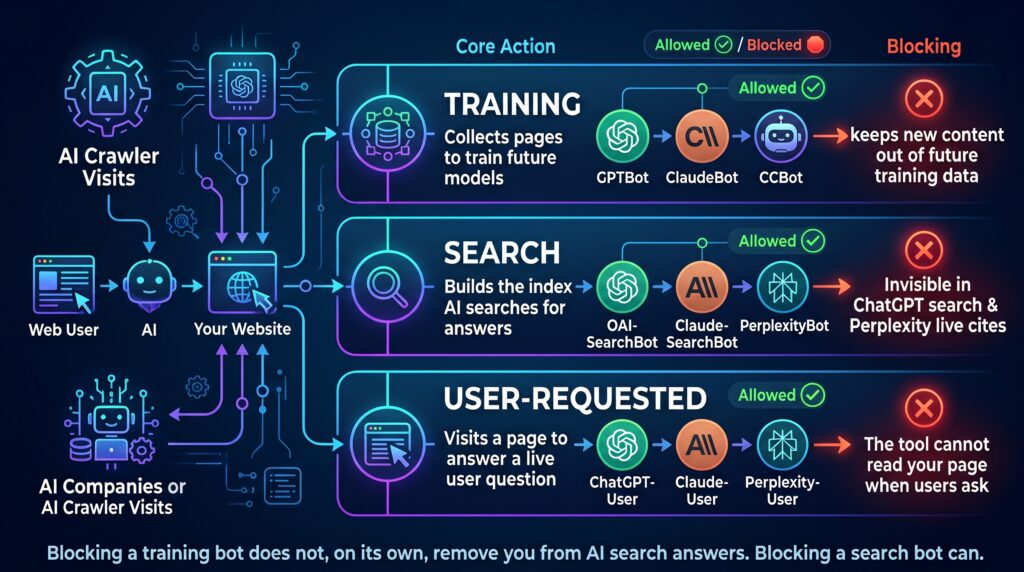
The key point is that these bots do three different jobs, often with a separate bot for each.
| Job | What the bot does | What blocking it means |
|---|---|---|
| Training | Collects pages that may be used to train future models | Your new content is kept out of future training data |
| Search | Builds the index an AI tool searches when it answers | Your pages are less likely to be found and cited in live answers |
| User-requested fetching | Visits a page because a user’s question needs it now | The tool cannot read your page when someone asks about it |
Blocking a training bot does not, on its own, remove you from AI search answers. Blocking a search bot can.
Which AI crawlers matter, and what does each one do?
These are the main user agents behind the AI tools UK buyers use most. Names change, so check each company’s documentation before editing your rules.
| Company | User agent | Job | Notes |
|---|---|---|---|
| OpenAI | GPTBot | Training | Disallowing it keeps content out of potential training |
| OpenAI | OAI-SearchBot | Search | Needed for pages to appear in ChatGPT search answers |
| OpenAI | ChatGPT-User | User-requested | OpenAI says robots.txt rules may not apply, because a user started the visit |
| Anthropic | ClaudeBot | Training | Blocking it excludes future content from training |
| Anthropic | Claude-SearchBot | Search | Blocking it stops your content being indexed for Claude’s search |
| Anthropic | Claude-User | User-requested | Blocking it stops Claude retrieving your pages for users |
| Perplexity | PerplexityBot | Search | Surfaces and links sites in Perplexity; Perplexity says it is not used to train foundation models |
| Perplexity | Perplexity-User | User-requested | Perplexity says it generally ignores robots.txt, because a user asked for the page |
| Googlebot | Search | Crawls for Google Search, including AI Overviews and AI Mode | |
| Google-Extended | Control token, not a bot | Governs Gemini training and grounding in the Gemini app; no effect on Search | |
| Microsoft | Bingbot | Search | Feeds the Bing index that Copilot draws on |
| Common Crawl | CCBot | Training (indirect) | Builds an open web archive that is widely used to train models |
Our platform guides cover each company’s bots in more depth: how ChatGPT chooses which businesses to recommend explains OAI-SearchBot, getting recommended by Claude covers Anthropic’s three bots, and how Perplexity chooses its sources covers PerplexityBot. For Bingbot, see Microsoft Copilot SEO.
What is Google-Extended, and does blocking it affect AI Overviews?
Google-Extended causes the most confusion, because it is not a crawler at all. Google’s documentation on its common crawlers describes it as a standalone product token. Google crawls with its usual user agents, and the Google-Extended rule in robots.txt only controls how that content may be used.
It covers two uses: training future Gemini models, and grounding, where content from the Google Search index is passed to the model at the moment it answers, in the Gemini app and on Vertex AI. Google states that Google-Extended does not affect inclusion in Google Search and is not used as a ranking signal.
So blocking it does not remove you from AI Overviews or AI Mode. Those are part of Search and follow your Googlebot rules; to limit what they show, Google points to the usual snippet controls (nosnippet, data-nosnippet, max-snippet and noindex). Blocking Google-Extended can, however, keep your pages out of the Gemini app’s grounded answers. Our guides to Gemini SEO and Google AI Overviews optimisation cover both sides.
How do you allow or block AI crawlers in robots.txt?
robots.txt is a plain-text file at the root of your domain, and each subdomain needs its own. Its rules are requests, not locks: reputable crawlers follow them, but nothing forces a bot to.
Rules sit in groups. Each group starts with one or more User-agent lines, followed by its Allow and Disallow lines. Here is one common setup, which keeps new content out of training while letting AI search and user-requested fetches through:
# Keep new content out of model training
User-agent: GPTBot
User-agent: ClaudeBot
User-agent: CCBot
Disallow: /
# AI search and user-requested fetches
User-agent: OAI-SearchBot
User-agent: ChatGPT-User
User-agent: Claude-SearchBot
User-agent: Claude-User
User-agent: PerplexityBot
Disallow: /account/
Disallow: /checkout/
# Everyone else, including Googlebot and Bingbot
User-agent: *
Disallow: /account/
Disallow: /checkout/
Three details matter more than they look.
- Named groups replace the general rules. A crawler that finds a group with its own name follows that group only and ignores the User-agent: * group. That is why the private folders are repeated in the named group above.
- Training is a business decision. Blocking training bots keeps new content out of future training data, but future models may then learn less about you from your own site. Decide deliberately rather than copying a template.
- Google-Extended is left out on purpose. Blocking it would also affect the Gemini app’s grounded answers, as explained above.
Rules can also be overridden before a bot reads them. Firewalls, security plugins and CDNs often block unfamiliar bots. Cloudflare, for example, has asked new customers since July 2025 whether to allow AI crawlers, with blocking as the starting point. If your robots.txt welcomes a bot but your firewall turns it away, the firewall wins.
Where does llms.txt fit in?
llms.txt is a different kind of file. Where robots.txt controls access, llms.txt offers a short, plain-text guide to your most useful pages, written for language models. Our guide to what llms.txt is and whether you need one explains how to write one and where it can help.
Keep its role in proportion. It does not grant or block access, so it cannot fix a robots.txt or firewall problem, and Google has said you do not need special AI text files to appear in its AI features. Treat it as a useful extra once access and rendering are sorted.
Why do rendering and clean HTML decide what AI crawlers can read?
Getting a bot to your page is half the job. It then has to find your content.
Many modern websites send a near-empty HTML shell and build the page in the browser with JavaScript. Googlebot runs that JavaScript before indexing. Most AI crawlers appear not to. An analysis of AI crawler traffic by Vercel found that none of the major AI crawlers it studied rendered JavaScript, including GPTBot, ClaudeBot and PerplexityBot, while Gemini benefits from Googlebot’s rendering. That was a snapshot from December 2024 and crawlers change, so test your own pages rather than assume.
If key content only appears after scripts run, such as prices, review widgets or whole single-page apps, those bots may see little or nothing. The fixes are well understood:
- Serve content in the initial HTML. Use server-side rendering or static generation for the pages that matter.
- Use real links. Standard anchor links with an href let bots move between pages; links that only work through scripts do not.
- Keep text as text. Headings, prices and opening hours inside images or PDFs are easy to miss.
- Put structured data in the page source. Schema added later by a tag manager may be missed by bots that do not run scripts. Schema markup for AI search explains which types are worth adding and how.
- Return clean status codes. Live pages should return 200, moved pages a single 301 and missing pages a real 404.
- Respond quickly. Slow responses and timeouts cut crawls short.
Clean HTML helps after the fetch too: clear headings and direct paragraphs are easy to extract, as how to structure content for AI search explains.
How can you check what AI crawlers actually see?
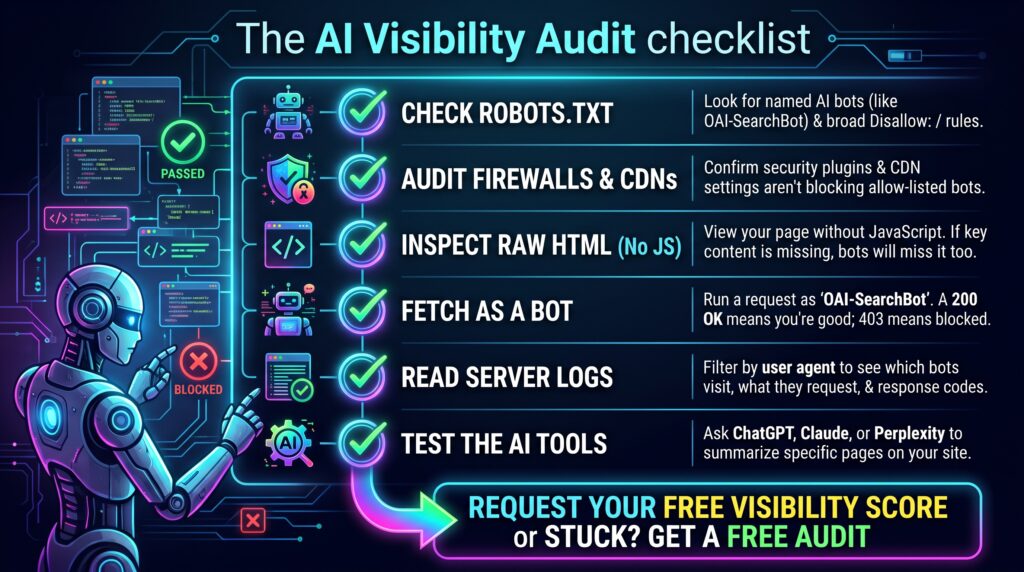
- Read your robots.txt. Open yourdomain.co.uk/robots.txt and look for named AI bots and any broad Disallow: / lines.
- Check your firewall, CDN and security plugins. Look for bot-blocking or AI crawler settings, and note which bots they let through.
- View the raw HTML. Use view source rather than the inspector, or load the page with JavaScript off. If your main content is missing, many AI crawlers will miss it too.
- Fetch the page as a bot. A command-line request with a bot’s user agent shows whether your server or firewall treats it differently.
- Read your server logs. Filter by user agent to see which AI bots visit, what they request and the status codes they get. OpenAI, Anthropic and Perplexity publish their bots’ IP addresses, so you can spot impostors.
- Use the search engines’ own tools. URL Inspection in Google Search Console shows how Googlebot renders a page, and Bing Webmaster Tools offers the same for Bingbot.
- Ask the AI tools. Ask ChatGPT, Claude or Perplexity to summarise a specific page. If one cannot, or gets the content wrong, look at access for that company’s bots.
For step four, a request like this returns the status code your server gives that user agent:
curl -I -A “OAI-SearchBot” https://yourdomain.co.uk/services/
A 200 means the page was served. A 403 or a challenge page points to a firewall rule. Some firewalls also check the IP address, so a test from your own machine is a guide rather than proof.
Checks like these form part of an AI visibility audit, and they are often the first thing to rule out when a business does not appear in AI results at all.
A worked example: a furniture retailer in Bath
Consider an independent furniture retailer in Bath whose website is built as a JavaScript single-page app (an illustrative example, not a named client).
The baseline. Its robots.txt, set up by a previous developer, blocks GPTBot and CCBot, which the owners are happy to keep. But a security plugin also blocks unknown bots, and that includes OAI-SearchBot, Claude-SearchBot and PerplexityBot. Product and delivery pages are almost empty until scripts run. AI tools answer “solid oak furniture shop in Bath” without mentioning the retailer, and ChatGPT cannot summarise its delivery page.
The fixes. The team allows the AI search and user bots in the security plugin and names them in robots.txt. Developers move key category, delivery and about pages to server-side rendering, put the schema into page templates instead of the tag manager, and add an llms.txt file. Within weeks, the server logs show OAI-SearchBot, Claude-SearchBot and PerplexityBot fetching those pages and getting 200 responses.
After a quarter. Perplexity cites the retailer for oak furniture prompts in Bath, and ChatGPT describes its delivery area correctly. Claude names it in some runs, so the next step is reviews and local mentions. Access was only the first barrier.
Common mistakes
- Blocking every AI bot in one go. A blanket block removes you from AI search answers, not just training.
- Blocking Googlebot to avoid AI Overviews. That removes you from Google Search entirely; snippet controls are the right tool.
- Assuming Google-Extended controls AI Overviews. It does not, though it does affect the Gemini app.
- Forgetting that named groups ignore the general rules. Private folders end up open to the bots you named.
- Trusting robots.txt alone. Firewalls and CDNs can override it without telling you.
- Expecting llms.txt to grant access. It is a guide, not a key.
Frequently asked questions
What is an AI crawler?
An AI crawler is an automated tool that fetches web pages for an AI company. Depending on the bot, those pages may train models, feed the index an AI tool searches, or answer a question a user has just asked. Each bot announces itself with its own user agent name.
Should I block GPTBot?
It depends on whether you want your content used to train OpenAI’s future models. Blocking GPTBot keeps new content out of that training, but it does not by itself stop your pages appearing in ChatGPT search, which relies on OAI-SearchBot. If AI visibility is your priority, allowing both is simpler, but choose deliberately.
Does blocking GPTBot remove my business from ChatGPT?
No. GPTBot collects content for model training. ChatGPT’s search answers rely on OAI-SearchBot, and pages a user asks ChatGPT to read are fetched by ChatGPT-User. To appear in ChatGPT search, make sure OAI-SearchBot is allowed in robots.txt and not blocked by your firewall, CDN or security plugin.
What is Google-Extended?
Google-Extended is a robots.txt control, not a separate crawler. Google crawls with its normal user agents, and the Google-Extended rule decides whether that content may be used to train Gemini models and to ground answers in the Gemini app and on Vertex AI. It does not affect Google Search inclusion or rankings.
Does blocking Google-Extended remove me from AI Overviews?
No. AI Overviews and AI Mode are part of Google Search, so they follow your Googlebot rules, and Google says Google-Extended does not affect Search. To limit what appears in those features, Google points to snippet controls such as nosnippet and max-snippet. Blocking Google-Extended can still affect the Gemini app.
What is the difference between ClaudeBot, Claude-SearchBot and Claude-User?
ClaudeBot collects content that may be used to train Anthropic’s models. Claude-SearchBot indexes content to improve Claude’s search results. Claude-User fetches pages when a Claude user’s question needs them. Blocking ClaudeBot only affects training, so check that the other two can reach your site if you want Claude to cite you.
Does PerplexityBot use my content to train AI models?
Perplexity says no. It describes PerplexityBot as a crawler that surfaces and links websites in Perplexity’s search results, not one that collects content for training foundation models. Blocking it makes your pages less likely to be cited in Perplexity answers, so most businesses seeking visibility there should allow it.
Do AI crawlers run JavaScript?
Mostly not, based on available evidence. Vercel’s analysis of AI crawler traffic, published in December 2024, found that the major AI crawlers it studied, including GPTBot, ClaudeBot and PerplexityBot, did not render JavaScript. Googlebot does, which helps Gemini. Put important content in the initial HTML so every bot can read it.
Does llms.txt control which AI crawlers can access my site?
No. robots.txt, along with your firewall and CDN settings, controls access. llms.txt is a plain-text guide that points language models to your most useful pages. It can help once bots can reach your site, but it cannot override a block, and Google says you do not need AI text files for its AI features.
How do I know if AI crawlers are visiting my website?
Check your server logs, or your host’s or CDN’s analytics, and filter by user agent names such as GPTBot, OAI-SearchBot, ClaudeBot and PerplexityBot. Note which pages they request and the status codes returned. Because names can be faked, confirm genuine visits against the IP addresses the AI companies publish.
Can AI crawlers ignore robots.txt?
Some fetchers can. robots.txt is a voluntary standard. Major AI companies say their training and search crawlers follow it, but OpenAI says robots.txt may not apply to user-initiated ChatGPT-User visits, and Perplexity says Perplexity-User generally ignores it. Firewall rules are the way to enforce a block, at the cost of that access.
Will allowing AI crawlers slow my website down?
Usually not by a noticeable amount on a typical business site, though large sites with thousands of pages can see heavy crawling. If load becomes a problem, rate limits at your CDN or host help, and Anthropic supports the Crawl-delay rule for its bots. Blocking crawlers outright usually costs more visibility than it saves.
Check what AI crawlers can see on your site
If you are not sure which AI bots can reach your pages, or what they find when they arrive, request your free visibility score. We will check your robots.txt, firewall settings and rendering alongside how often AI tools name you, and show which fixes come first. Crawler access, rendering and site health all sit within our SEO services, so the same work helps search engines and AI tools alike.