
You already know about robots.txt. It is the file that sits in your website’s root directory and tells search engine crawlers which pages to index and which to ignore. Most websites have one. Most business owners have never read it.
llms.txt is the AI equivalent.
It is a simple text file that tells large language models what your website is about, which content they should prioritise, and how to describe your business accurately. Most UK websites do not have one yet. That is the opportunity.
If you want AI systems like ChatGPT, Perplexity, Gemini, and Google AI Overviews to recommend your business accurately and consistently, llms.txt is one of the clearest technical signals you can send. This guide explains what it is, why it matters, and how to create one today.
What Is llms.txt?
llms.txt is a plain text file written in Markdown format and placed in the root directory of your website, accessible at yourwebsite.com/llms.txt. Its purpose is to give AI systems a clean, structured summary of your website’s most important content so they can understand and reference your business more accurately.
Think of it this way. When an AI system encounters your website, it typically has to parse through navigation menus, cookie banners, JavaScript-heavy layouts, footer links, and marketing copy to extract meaning. That process is imprecise. The AI may miss key services, pick up outdated descriptions, or combine information incorrectly.
llms.txt solves that problem by providing a curated, readable summary in a format AI systems can process efficiently. It is the difference between handing someone a well-organised briefing document and leaving them to figure out your business from a cluttered reception desk.
A typical llms.txt file contains:
- Your business or website name (as the H1 heading)
- A brief description of what your business does and who it serves (in a blockquote)
- Links to your most important pages, grouped into logical sections with short descriptions
- Optional sections for secondary content that AI systems can skip if context space is limited
The file lives at your root domain. It must be publicly accessible. Anyone, including AI crawlers, can view it by navigating directly to the URL. This transparency is intentional. It allows AI developers, researchers, and the platforms themselves to see how you have described your business, and to trust that description because you have made it explicit.
Where Did llms.txt Come From?
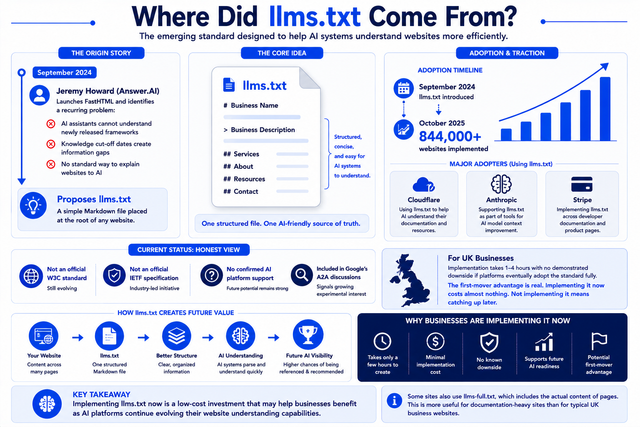
llms.txt was proposed by Jeremy Howard of Answer.AI in September 2024. Howard had just released FastHTML, a Python library for web development, and encountered a recurring problem: AI coding assistants could not help developers use it because the library was newer than the models’ training cutoff dates. There was no clean way for AI systems to quickly understand what a new or evolving website contained.
His solution was straightforward: a single Markdown file at the root of any website that provides a structured, LLM-friendly overview of the site’s content and purpose.
The proposal gained rapid traction. Over 844,000 websites had implemented llms.txt by October 2025, according to BuiltWith tracking. Major companies including Anthropic, Cloudflare, and Stripe are among those using the standard.
It is worth being honest about where the standard currently stands. llms.txt is not yet an official W3C or IETF specification, and no major AI platform has formally confirmed they actively read these files. However, the adoption trajectory is significant, and Google included llms.txt in their Agents to Agents (A2A) protocol, signalling at least experimental interest.
For UK businesses, the practical calculus is simple: implementation takes one to four hours with no demonstrated downside if platforms eventually adopt the standard fully. The first-mover advantage is real. Implementing it now costs almost nothing. Not implementing it means catching up later.
Why llms.txt Matters for AI Visibility
To understand why llms.txt matters, you need to understand how AI systems currently read your website without it.
Large language models do not browse websites the way a human does. They process text. When an AI system retrieves information about your business, it has to convert your HTML pages into something it can understand. Navigation menus, JavaScript rendering, cookie consent pop-ups, sidebars, and inconsistent descriptions across pages all create noise. The AI extracts what it can from that noise and builds an understanding of your business from the result.
That process produces errors. A service you offer on one page may be missing from another. An old description that was accurate three years ago may still be indexed. Your key differentiators, the things that make you the right choice for your ideal customer, may never be extracted at all because they are buried in a paragraph the AI did not prioritise.
The result is hallucination. Not malicious hallucination. Structural hallucination. The AI fills gaps in its understanding with inferences and approximations. Your business ends up being described inaccurately, incompletely, or not at all.
This is the problem that llms.txt directly addresses. By providing a structured, authoritative summary of your business in a format AI systems can read cleanly, you reduce the gap between what AI systems infer about you and what is actually true.
At AI Listings, this is what we refer to as the Hallucination Guard™ layer of AI visibility. It is the set of measures a business takes to ensure that when AI systems reference them, the description is accurate, complete, and representative of how the business actually wants to be understood. llms.txt is one of the most direct implementations of that principle.
When combined with the other signals covered in our guide to What Is AI Visibility? The Complete Guide for UK Businesses, including entity clarity, brand consistency, and topical authority, llms.txt gives AI systems a verified starting point for understanding your business. That matters because AI systems are more confident citing businesses they can understand clearly.
The broader context here is significant. AI-referred traffic is growing faster than any other referral channel, and businesses that give AI systems cleaner, more accurate information about what they offer are better positioned to capture that traffic as it compounds.
What Goes Inside an llms.txt File?
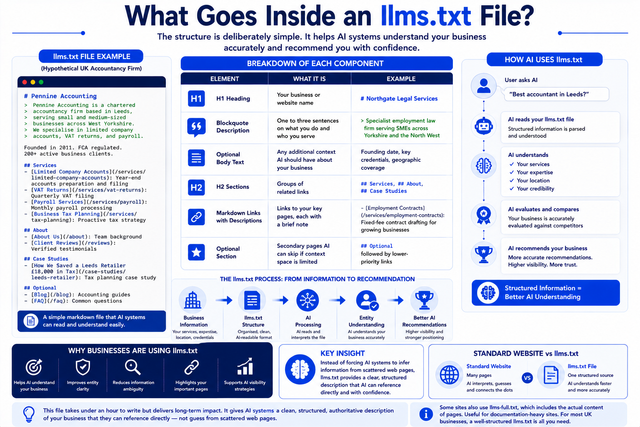
The structure is deliberately simple. Here is a breakdown of each component, followed by a practical example relevant to a UK service business.
| Element | What It Is | Example |
| H1 heading | Your business or website name | # Northgate Legal Services |
| Blockquote description | One to three sentences on what you do and who you serve | > Specialist employment law firm serving SMEs across Yorkshire and the North West |
| Optional body text | Any additional context AI should have about your business | Founding date, key credentials, geographic coverage |
| H2 sections | Groups of related links | ## Services, ## About, ## Case Studies |
| Markdown links with descriptions | Links to your key pages, each with a brief note | – [Employment Contracts](/services/employment-contracts): Fixed-fee contract drafting for growing businesses |
| Optional section | Secondary pages AI can skip if context space is limited | ## Optional followed by lower-priority links |
Here is how that looks as an actual llms.txt file for a hypothetical UK accountancy firm:
# Pennine Accounting
> Pennine Accounting is a chartered accountancy firm based in Leeds,
> serving small and medium-sized businesses across West Yorkshire.
> We specialise in limited company accounts, VAT returns, and payroll.
Founded in 2011. FCA regulated. 200+ active business clients.
## Services
– [Limited Company Accounts](/services/limited-company-accounts): Year-end accounts preparation and filing for UK limited companies
– [VAT Returns](/services/vat-returns): Quarterly VAT filing and Making Tax Digital compliance
– [Payroll Services](/services/payroll): Monthly payroll processing for businesses with 1–50 employees
– [Business Tax Planning](/services/tax-planning): Proactive tax strategy for business owners
## About
– [About Us](/about): Team background, qualifications, and company history
– [Client Reviews](/reviews): Verified testimonials from current clients
## Case Studies
– [How We Saved a Leeds Retailer £18,000 in Tax](/case-studies/leeds-retailer): Tax planning case study
## Optional
– [Blog](/blog): Accounting guides and tax updates for UK business owners
– [FAQ](/faq): Common questions about our services and pricing
This file takes under an hour to write. It gives AI systems a clean, structured, authoritative description of the business that they can reference directly rather than inferring from scattered web pages.
Two additional conventions are worth knowing. Some websites also publish an llms-full.txt file, which contains the actual content of linked pages rather than just links. This is more useful for documentation-heavy sites than for typical UK service businesses. For most businesses, a well-structured llms.txt is sufficient.
Does Your Website Need One?
The honest answer for most UK businesses is yes. Here is a simple framework to work out where you fall.
You need one immediately if:
You have service pages, location pages, or product descriptions you want AI systems to reference accurately. You have had AI systems describe your business incorrectly or incompletely. You are actively working to improve your AI visibility and want every technical signal in place. Your business is in a competitive local market where AI recommendations influence purchasing decisions. This describes the majority of UK SMEs.
It is useful but not urgent if:
Your business is primarily transactional with little need for AI recommendation. You operate in a sector where AI overviews are not yet common. You are early in building your web presence and have more fundamental priorities first.
It is lower priority if:
You run a purely product-based e-commerce site where discovery happens through other channels. Your customers do not use AI tools to research purchasing decisions in your category.
The broader point is this. llms.txt sits within a wider AI visibility framework. Implementing it without attending to the other signals covered in our AI Visibility Optimisation Services guide will have limited impact. But as part of a coherent strategy, it is one of the lowest-effort, highest-signal technical improvements a UK business can make right now.
If you want to understand where your current AI visibility stands before implementing anything, the LLM Visibility Score™ assessment is a good starting point.
How to Create and Implement llms.txt: Step by Step
You do not need a developer for this. The file is plain text. If you can write an email, you can write an llms.txt file.
Step 1: Decide what to include
Make a list of your most important pages. At a minimum, include: your homepage, your core service or product pages, your about page, and any case studies or testimonials pages. If you have a blog, include it as an Optional section. Keep the list focused. The goal is not to replicate your sitemap. It is to give AI systems a curated, prioritised view of your business.
Step 2: Write the file
Open any plain text editor, Notepad on Windows or TextEdit on Mac (important: on Mac, go to Format and select Make Plain Text before you start writing, otherwise TextEdit will save in Rich Text format which will break the file). Write your llms.txt using the structure from the example above. Use the # symbol for your business name, > for your description, ## for section headings, and – [Page Name](URL): Brief description for each link. Keep descriptions concise: one sentence per link is enough.
Step 3: Validate the formatting
Before uploading, check your file using a free Markdown validator. A useful tool for this is available at llmstxt.org, the original specification site maintained by Answer.AI. Confirm all links are working and formatted correctly. Even small syntax errors can affect how AI systems parse the file.
Step 4: Upload to your root directory
Save the file as llms.txt with no capital letters. Upload it to the root directory of your website so it is accessible at https://yourdomain.co.uk/llms.txt. In WordPress, this typically means uploading via FTP or your hosting control panel’s file manager to the same directory as your wp-config.php file. In most other CMS platforms, the root directory is accessible through your hosting dashboard.
Step 5: Verify it is live
Open a browser and navigate to https://yourdomain.co.uk/llms.txt. You should see your plain text file. If you see a 404 error, the file is not in the right location. Check the directory and re-upload.
Step 6: Test with an AI system
Open ChatGPT or Perplexity and ask: “What does [your business name] do?” Compare the response to your llms.txt description. Over the following weeks, as AI crawlers index your file, you should notice improved accuracy in how AI systems describe your business. This is also a useful baseline test to run before you implement llms.txt, so you can see the difference.
For a broader view of how llms.txt fits into a full technical AI SEO approach, the Shortlist System™ covers the complete set of signals that drive AI recommendation performance.
Frequently Asked Questions
What is llms.txt?
llms.txt is a plain text file written in Markdown format and placed in the root directory of your website. It provides AI systems like ChatGPT, Perplexity, Gemini, and Google AI Overviews with a structured, accurate summary of your business, services, and key pages. It is designed to improve the accuracy of how AI systems understand and reference your business, reducing the risk of inaccurate or incomplete descriptions in AI-generated answers.
Is llms.txt an official standard?
Not yet. llms.txt was proposed by Answer.AI’s Jeremy Howard in September 2024 and has been widely adopted by major companies including Anthropic, Cloudflare, and Stripe. It is not currently a formal W3C or IETF standard, and not all AI platforms have publicly confirmed active support. However, adoption is growing rapidly, Google has included it in experimental AI protocols, and implementation carries no downside risk. For UK businesses, acting now is lower cost than catching up later.
Will llms.txt improve my AI search visibility?
llms.txt is one signal within a broader AI visibility strategy. On its own, it improves the accuracy of how AI systems describe your business, which reduces hallucination risk and supports more consistent recommendations. The businesses that see the strongest AI visibility gains combine llms.txt with entity clarity, brand consistency, structured content, and a strong review presence. Think of it as one important component, not a standalone fix.
Do I need a developer to create an llms.txt file?
No. llms.txt is a plain text file that anyone can write using a basic text editor. The format is simple Markdown: a heading, a short description, and a list of links with brief notes. Writing the file takes under an hour for most businesses. Uploading it to your root directory is a standard file management task most non-developers can complete through their hosting dashboard or CMS. If you use WordPress and are unsure, your hosting provider can help.
How do I know if my llms.txt is working?
There are two practical checks. First, confirm the file is live by navigating to yourdomain.co.uk/llms.txt in a browser. If you see your plain text file, it is accessible. Second, test AI accuracy before and after implementation by asking ChatGPT or Perplexity what your business does and comparing the response to your llms.txt description. Accuracy improvements typically become visible over several weeks as AI crawlers re-index your site. For a systematic measurement of your overall AI visibility, the AI Visibility Quiz tracks performance across multiple AI platforms over time.
Take the Next Step
llms.txt is one of twelve technical AI visibility signals we check in every AI visibility audit. Most UK businesses we work with have none of them in place when they start.
Get Your Free AI Visibility Audit and find out exactly where your business stands across all thirteen signals today.
About the Author
AI Listings Team
AI Listings is a UK-based AI visibility agency helping businesses become visible, trusted, and recommended across AI search platforms including ChatGPT, Perplexity, Gemini, and Google AI Overviews. The team specialises in AI visibility optimisation, entity clarity, and the technical signals that determine whether a business is recommended by AI or overlooked by it.
AI Listings operates as a trading name of Primrose Point Ltd and is the creator of the Shortlist System™, LLM Visibility Score™, and Hallucination Guard™ frameworks for measuring and improving AI visibility.